
Google Ads · Local Services Ads · Microsoft Ads
Google Ads Management
Search campaigns built for phone calls, not clicks — on an ad account you own.
Google Ads Overview (formerly Google AdWords)
How Google Ads Work
Google Ads are an amazing opportunity for advertisers to get your message in front of your prospects at the exact moment that they are searching for your services.
Within your ad campaign, you’re able to “bid” on keywords related to your business. When your target customer searches for those keywords, you’re able to show a highly customized ad to that prospect that effectively promotes your services.
When the prospect clicks on your ad, they are taken to a specially designed page on your website – a landing page – that encourages the customer to make contact. They’ll either pick up the phone and call you or fill out a form requesting that you get in touch with them.
No other form of online marketing allows you to have such a great degree of control over your prospect’s journey to your website.
Google Ads vs SEO
A distinct advantage of Google Ads over SEO is that Google Ads dominate search results.
First, let’s cover a couple of online marketing concepts:
- Above the fold: This is the most valuable real estate in online marketing. The “above the fold” is the area that a visitor sees when visiting a web site – before scrolling down on the page. Many users won’t scroll down, so you want your most relevant content to be above the fold.
- Call to Action: What you want your customer to do – usually clicking on a button to make contact or filling out a form.
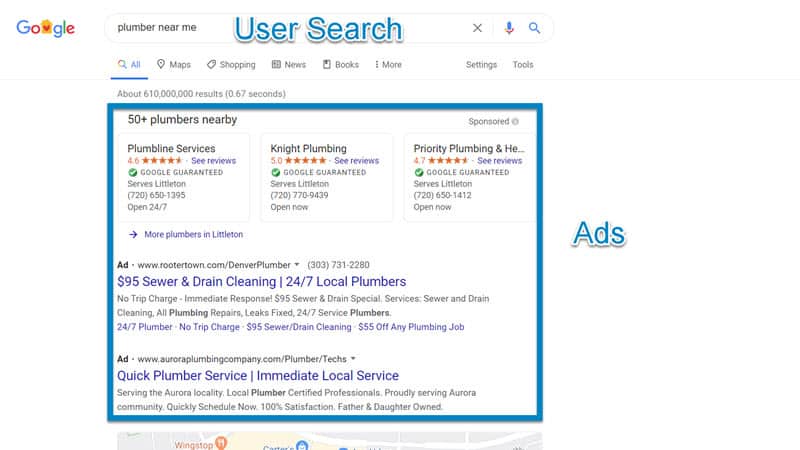
As you’ll notice in the search results above for a search of “plumber near me”, Google shows nothing but ads above the fold. You have to scroll down to see the organic (free) listings.
To be seen above the fold in most search results, you’re going to have to advertise on Google – and not rely entirely on SEO. (Although in most cases we advocate both a strong SEO and paid search strategy).
How Our Campaign Management Services Can Help You
With FlexLeads Google Ads Management, we will take over the day to day management of your Google Ads campaigns.
We use competitive tools to look at the search engine results page and perform an in-depth analysis of competing advertisers. We’re able to reverse engineer their campaigns to zero in on your competitor’s:
- Keywords
- Ads
- Budgets
- Landing Pages
Using this information gives us an idea of what your competition is doing right – as well as what they’re doing wrong. From this, we can come up with better keywords, ads, and landing pages to meet your needs.
Keyword Research, Discovery, and Management
Keywords are words or phrases that you place a monetary bid on within the Google Ads platform. If someone conducts a search on Google that is similar to your keywords, your ad may appear (based on a variety of factors including your bid).
The key to finding the proper keywords will vary depending on where you want to capture your prospect in the buying process. In general, more urgent or transaction-oriented keywords are likely to get immediate action from the searcher. (example: emergency dentist). Whereas, if you intend to educate or build a list of prospects, more informational keywords may work best (example: what are dental implants).
Over time, we’ll find the keywords that perform the best for your campaign and emphasize those keywords with higher bids and more intense focus.
Removing Keywords from a Campaign
Some keywords won’t perform well. Either those keywords don’t generate a substantial ROI – or they don’t get many searches. Those keywords will be removed from the account so that we can focus attention on what is working.
Negative Keywords
An essential part of this process is to have a well developed negative keyword list. Negative keywords will prevent your ad from showing if a customer uses a negative keyword as part of their search phrase. They help to protect your budget by preventing unqualified customers from ever seeing your ad.
For example, most clients use “free” and “DIY” as negative keywords. Those prevent your ads from showing for searches like:
- “Free Dental Work”
- “DIY Toyota Camry Dent Removal”
For more on this — including thousands of free negative keywords — see our negative keywords resource.
Precise Ad Targeting
Google has terrific ad targeting features available that allow you to best position your ads to get them in front of qualified prospects when it works best for both you and those prospects.
Geographic Location Targeting (GeoTargeting)
You can limit your ads to show only to prospects that fit your requirements.
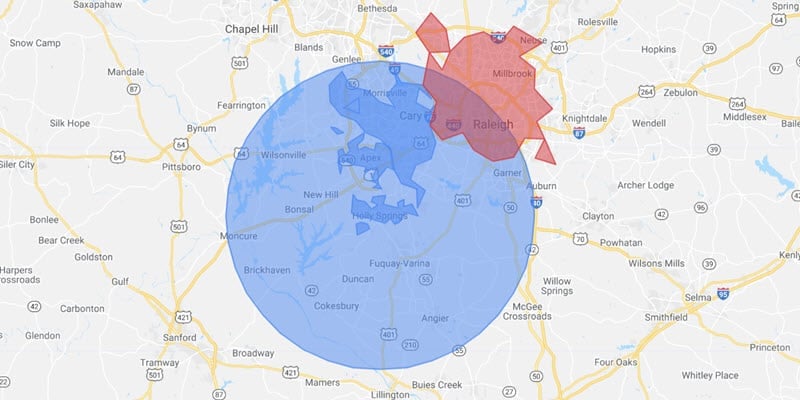
Within Google Ads, you have many geographic targeting options available:
- Country – You can ensure that Google runs ads focusing on a particular country
- States – You can also target your ads to individual states.
- Cities – For local businesses, this can be a great option – you can run your ads so that only people within certain cities will see the ads.
- Zip Codes – This can be another option for running ads – making sure your ads only appear in specific zip codes.
- Radius Around Your Business – With radius targeting, you can set up a radius around your office – and only people within that radius will see your ads. Radius targeting is beneficial for local businesses.
Different Bids for Different Geographical Locations
Another great feature of setting up different targeting areas is that you can actually vary your bid price for each area. If your best customers are located close to your office, you can pay more for ad clicks that come from nearby, versus those who are several miles away.
Exclude Geographic Areas that Don’t Fit Your Demographic Profile
You can also exclude certain areas from seeing your ads. Geographic exclusions can be extremely helpful if your service or product is highly dependent on a specific demographic.
An example of excluding a demographic would be a pediatrician advertising in parts of the cities with young families, and explicitly excluding zip codes that are comprised mainly of retirees. That way, unqualified candidates won’t be able to click on your ads and waste your budget.
Time of Day
You probably don’t want to run your ads 24×7. Fortunately, you can choose to run ads only when your staff is available to properly field phone calls and form requests as they come in.
With Google, you can schedule your ads to run only when you (or staff) are available to handle those leads.
You aren’t locked into a specific schedule. Provide us with your schedule each week, and we’ll make sure that ads only run when you have available staff to pick up the phone.
Bidding by Device
Some industries do better on desktop – others do well on mobile.
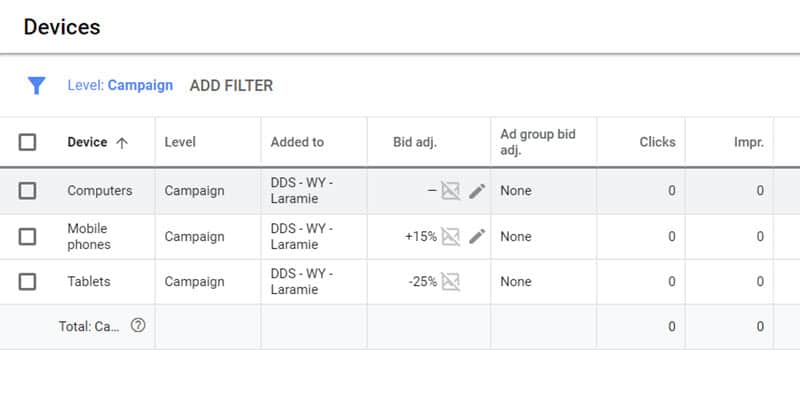
We will monitor the performance of your costs and conversions by device. From this information, we’re able to adjust bids and ad campaigns for each type of device.
Demographics Some demographics perform better than others. Google is getting better and better at providing performance-based the following demographic categories:
- Age
- Gender
- Household Income
- Parental Status
Based on your initial requirements and continuous monitoring, we’re able to adjust campaigns to cater to specific demographics when it helps you to get a good return.
Ad Creation, Testing and Improvement
Google ads done right is survival of the fittest. Getting your ad copy dialed in is essential to converting prospects into leads.
The strategy is to have three ads “compete” with each other continuously in an A/B testing environment. The best performing ads get to remain and continue to generate your business. New ads replace the ads that don’t perform as well.
Critical components of a properly structured Google Ad:
Headline The headline is by far the most crucial part of your search ad. We’ll make sure that we get it right for you.
Your Google Ad headline should very closely match what the prospect searched for in Google and be compelling enough to get prospects to click. Sometimes competing ads all look the same – we’ll make sure that yours stands out (in the right way) from the others.
To get the desired headline impact, we generally employ three ads with three different types of headlines that appeal to searchers in one of three ways:
- Deals – Leading with special offers – either % discounts or $ dollar amounts catch the eye and have a tremendous impact on your prospects.
- Emotional – Another successful ad type appeals emotionally to the prospect. It describes how you can solve their problem and transform their lives.
- Logical – With logical headlines, we’re trying to resonate with those more practical searchers. We show them how they’ll be making the right choice by using your services.
Descriptions While not as impactful as headlines, we also take advantage of descriptions within ads to get into more of a deep dive into the services that your business offers. We pit these descriptions against each other in a “survival of the fittest” test.
Ad Extensions Google Ads has many ad extensions that you can use to convey more information to your prospect. Some of the key extensions used for service businesses include sitelinks, callouts, structure snippets, and location extensions.
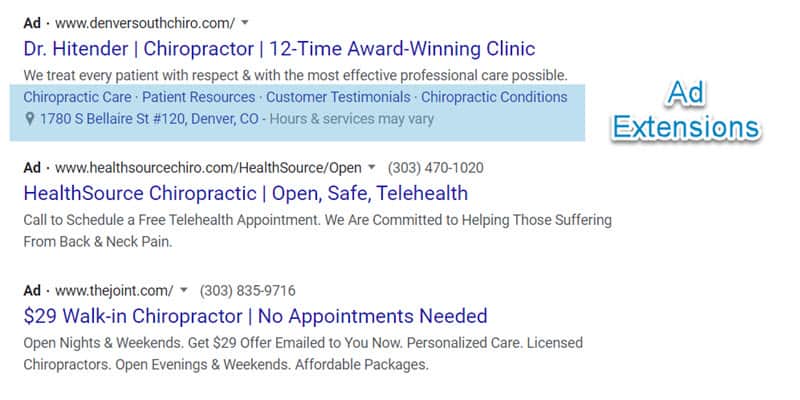
Perhaps the biggest benefit of these ad extensions is that they really make your ad stand out. We’ll use as many as possible for your business. The result is a larger ad that is more appealing to site visitors that is more likely to get more clicks.
Call Tracking
Included in our Google Ads management process is call tracking. We record and report on all incoming calls that our marketing activities generate for your business. Calls are tied to search terms and help us to determine what keywords and ad campaigns are generating revenue for your business.
As part of our call tracking services, we break out calls that are less than one minute – this allows our customers to identify front desk problems quickly.
Reporting on Ad Campaigns
The only way to know how effective we are as a Google Ads agency is to measure the results and present them to you. We used to use Google Analytics to measure all website activity - but now use Plausible Analytics for all of our reporting. Google Analytics has become unwieldy and hard to use and hard for our clients to understand - which is why we made the switch. If you’ve ever had to deal with Google Analytics 4, you no doubt understand how challenging it is to work with.
Real-Time Reporting We provide daily, monthly, and even some real-time reporting. With our reporting, you’ll be able to see budget and conversion campaign performance with a glance.
Budget Tracking Our reporting lets you know how you’re performing relative to your monthly budget. Based on performance, during the month, we may increase or decrease the ad spend to meet your budget goals.
Conversion Tracking & Reporting Leads include anyone that filled out a form or called you.
A Web Page That Converts Prospects Into Leads
A landing page is a page on a website where prospects arrive after clicking on one of your ads.
You need to have a website that can convert your prospects into paying clients. We implement websites that are built to convert for all of our clients.
We build and host these pages as part of our website service, which is why we need full access to them.
Local Services Ads
Google Local Services Ads (LSAs) sit above regular search ads and above the map pack — the best position on the page. You pay per lead rather than per click, and your ad carries the Google Guaranteed badge once your business passes Google’s screening.
LSAs are available to most home-service categories and to some professional practices. For the trades, they’re often the fastest way to get the phone ringing. We set them up and manage them alongside your search campaigns:
- Service area and job types — only the zip codes and services you actually want to pay for leads on. Your LSA service area doesn’t have to be your whole service area.
- Budget and bidding — a weekly budget and a maximum cost per lead, tuned to what a job is worth to you.
- Ad schedule — ads run when someone can answer the phone. Google tracks how fast you respond, and slow responders rank lower.
- Lead disputes — Google charges for some leads it shouldn’t (out of area, wrong service, spam). We audit every lead and dispute the bad ones within the 30-day window.
- Reviews — reviews collected through LSAs are labeled “Google Verified” and directly affect your ad rank. We build review collection into the process.
Some categories require extra verification before ads run — garage door companies, for example. See our Advanced Verification guide.
Microsoft Ads
Bing has a small slice of search — under ten percent — but the advertisers who ignore it leave cheap clicks on the table. Competition is lighter, so the same keyword costs less, and the audience skews older and more affluent.
Our approach: get Google Ads producing first, then port the campaign to Microsoft. That port isn’t automatic:
- Geotargeting doesn’t map one-to-one. Microsoft’s import tool has burned plenty of advertisers by quietly expanding their territory to the whole planet. We rebuild targeting by hand and verify it.
- Bids come down. A click on Microsoft should cost less than the same click on Google. We lower bids at launch and tune from there.
- Features drift. Google ships things Microsoft doesn’t support. We keep the two accounts in step so nothing breaks.
Call tracking, reporting and account ownership work exactly as they do for Google. Ad costs for local businesses on Microsoft are usually a fraction of Google’s.
Google Ads Audits
Even a well-run account needs a fresh set of eyes now and then. If your campaign hasn’t been touched in months, if costs are climbing while conversions fall, or if you’re not sure the person managing it — agency, contractor, employee, or you — is up to it, an audit is a fixed-scope way to find out.
Audits are billed hourly and scoped to the size of the account; a local campaign takes far less time than a national one. You get a written list of what’s wrong and what to change, and you decide whether to implement it yourself or have us take over the account. Contact us for a scope and estimate.
What to Look for in a Google Ads Manager
We Use a Manager Account - You Still Own Your Account
When you work with us, you own your Google Ads account – not us. We perform optimization activities for each campaign in your accounts through a manager account. You maintain overall ownership.
Many marketing companies won’t give you access to the ad campaigns that they are running on your behalf. If you decide to stop working with them, you don’t have access to your account or the valuable campaign data that has accumulated in your ad account.
We think it is vital that you own the account and have full access to all the data within it.
Transparency
You should have full access to all ad campaign data. With our reporting, we try to hit the highlights of what we think you will find most important, but you’ll always have access to as much of the underlying data you’d like. After all, it is your ad account.
Too many companies don’t have full transparency, and it isn’t always easy for their clients to see how much of their spend is going to the marketing company’s pockets, and how much is actually being spent on ads.
Feedback
We keep you in the loop.
Two questions you should never have to ask:
Am I getting a good return on my Google Ads activities?
What is my Google Ads Management company doing?
With our services, you’ll always know where you stand.
Our reports provide you with all cost and lead data so you’ll know for sure that you’re getting a solid return on your investment.
Google Ads Management Pricing
Each client has unique requirements. Unfortunately, it is impossible to provide an estimate for managing your Google Ads campaign without learning more about your business first.
We offer a flat-rate pricing for all of our clients, depending on their needs.
Pricing for Google Ads management depends on the size and complexity of your account.
We Charge a Flat Monthly Fee
We Don’t Charge a Percentage of Ad Spend. Ever. Many companies will charge a percentage of ad spend in addition to a monthly flat-rate fee. We’re not a fan of this approach.
We believe that this wrongly incentivizes companies to increase ad spend.
We’ve encountered unethical companies that boost ad spend using strategies and ad platforms that aren’t benefiting their client to generate more revenue for themselves.
We only advertise where there is a clear benefit to you, our client. While we welcome experimenting with different Google advertising options as they become available, we won’t advertise on any platform that doesn’t get you a solid ROI.
Hourly Rate
In some cases, we will take on projects that have a limited duration.
In those cases, depending on needs, we charge an hourly rate for Google Ads management services.
Usually, these engagements are for audits or initial ad campaign setup.
Google Ad Costs
In addition to our monthly fee, there will be an additional ad cost that you will pay directly to Google within your account.
For local businesses, ad costs vary widely by industry and market; some local service providers (like dentists and optometrists) spend considerably more than others.
We may periodically request that you raise your budget – but only if we’re trying to capitalize reaping the benefits of a solid ROI.
To learn more about our managed Google Ads services, call 1-888-959-6867 or send a message.
Frequently asked questions
Do I get a dedicated Google Ad Manager for My Google Ads Campaign?
Yes — you work with Frank. No junior specialists, no hand-offs, no being shuffled to a new account manager every quarter. The person who sets up your campaigns is the person who manages them.
Are you a Google Partner or Google Premier Partner?
FlexLeads held Google Partner certification status for many years. Over the years, the criteria for becoming a Google Partner changed and is often at direct odds with the goal of our clients. For example, Google has minimal ad spend requirements over given time frames, as well as “optimization scores” across Google Accounts (that applies to both Google Search and Google Display Ads). Criteria like this results in more revenue to Google and doesn't take into account the goals of the client. Our goal with our digital marketing activities is to do what is best for our clients - as opposed to meeting goals set by Google. Our focus is implementing Google Ads Services that provide you with positive return on investment (or whatever your business goals are).
Do You Advertise on the Google Display Network?
We can, but we recommend against it for most local businesses - as the Display Network is best for branding purposes. For the majority of our clients, we don't include the Google Display Network as part of our overall Google Ads Management Services. We prefer to run a client's Google Ads campaign on the search network only. Search campaign ads only appear when someone conducts a search in Google. The person conducting the search has an immediate need that needs to be fulfilled - and an ad from your advertising campaign appears in front of them at the exact moment they need your services. The Google Display Network offers little to no value for the local business clients that we serve. On the Google Display Network, banner ads and text ads appear on various websites across the web on sites Google believes are relevant for your business. These types of ads are better suited for branding as opposed to direct response marketing.
Do You Offer Ads for ECommerce Websites or Google Shopping Ads?
No. Our clients are mostly focused on generating leads for their business as opposed to Google Shopping. So we won't be able to put together a Google Shopping campaign together for your business.
Are you a Microsoft Advertising Partner?
No. We used to be a Microsoft Advertising Partner, but as with the Google Partner program, eligibility for partnership with Microsoft is dependent on ad spend goals. As your advertising partner, our goal is to spend as little as possible on Microsoft advertising campaigns, while providing you the best possible return on your investment. Both Microsoft and Google partner programs incentivize increased ad spend on your advertising campaign - at FlexLeads, our goal is to minimize your overall ad spend.
Let's get started
Tell us about your business and what you're trying to grow. Frank reads every message.