
RESOURCES · NEGATIVE KEYWORDS
Negative Keywords
Stop paying for searches that will never become customers.
Google’s and Microsoft’s loosening of exact and phrase match over the years means ads match ever-looser queries, which is why negatives matter more every year. Exact match used to mean the search had to match the keyword; phrase match used to mean the search had to contain the phrase. Both now lean on “same meaning” and “close variations,” so your ads show for searches you never bid on — unless you block them.
Match Types in Google
Before we get too deep into negative keywords, let’s discuss match types.
Google has 4 official match types:
- Broad Match — This match type is very open-ended. Your ad may show if a user searches for your keyword, a related keyword or a variation of your keyword.
- Broad Match Modifier (BMM) — More strict than broad, if you’re using this match type, your ad may show if a user’s search contains all of your BMM keywords anywhere in their search term — or close variations of your keywords with the same meaning.
- Phrase Match — Your ad may trigger when a user’s search contains your exact keyword phrase or a close variation of your keyword phrase with the same meaning.
- Exact Match — Exact matches of your keyword or close variations with the same meaning.
Over the years, these match types have changed significantly.
Google now has much more leeway in which situations it will show your ads. Words like “related”, “same meaning” and “close variations” give Google a lot of latitude in when it will show your ads.
For example, it used to be that if you had an exact match keyword, your ads would only be triggered if someone’s search phrase exactly matched your keyword.
Not anymore. Now your ads are much more likely to show for searches that are irrelevant to your keywords and their associated match types.
Google’s reasoning is that it will help advertisers. From the official Google Ads blog on 4/17/2012 — “Based on our research and testing, we believe these changes will be broadly beneficial for users and advertisers”.
The more cynical observer may think that Google is trying to get more ads competing for Google searches. More competing advertisers can result in a direct increase in the click cost for search ads.
I’ll let you decide.
In any case, the advertiser no longer has the same tight control over their keywords and, as a result, has much less ability to determine where their ads will appear.
One of the best ways to prevent unqualified people from seeing your ad, clicking on your ad, and destroying your budget is to deploy negative keywords.
What is a Negative Keyword?
According to Google, a negative keyword is “a type of keyword that prevents your ad from being triggered by a certain word or phrase”.
Negative keywords are essential for your ad campaigns in Google and Microsoft because you will inevitably come across searches that trigger your ads that aren’t relevant to your business goals.
How Negative Keywords Work
The most straightforward and most cited example of a negative keyword is the word “free”.
Most people who are advertising online will want to use the word “free” as a negative keyword.
For example, if you’re a dentist, you don’t want your ad for dental cleanings to show up if someone searches for “dental cleanings free” or “free teeth cleanings”. People that are looking for things for free are not a good investment for your business. So you should make “free” a negative keyword.
Note that unlike Google’s match types, negative keywords don’t take into account close variants.
Keeping with the dental example, if you make “cheap” a negative keyword (always a good idea), your ads will still show if someone searches for “cheapest dental cleanings”.
Negative Keywords Structure
Your negative keywords can be one or more words, and there are different match types:
Negative Broad Match
Your ad won’t show if the user’s search contains all of your negative keyword terms. The negative keyword terms can appear in any order in the user’s search.
Negative Phrase Match
Your ad won’t show if the user’s search contains all your negative keyword terms in the same order. There can be other terms surrounding your search phrase.
Negative Exact Match
Your ad won’t show if the user’s search exactly matches your negative keyword (with no other words in their search phrase).
Example Searches
Can your ad be shown for the search with the match type below? (NO means the negative blocked the ad; YES means the ad can still show.)
| User’s search | Negative broad: independent contractor | Negative phrase: “independent contractor” | Negative exact: [independent contractor] |
|---|---|---|---|
| Independent Contractor Near Me | NO | NO | YES |
| House Contractor Independent | NO | YES | YES |
| Independent Contractor | NO | NO | NO |
| Independent Contractors | YES | YES | YES |
| General Contractors Near Me | YES | YES | YES |
Plurals of negative keyword terms won’t prevent the ad from showing — likewise, singular versions of negative broad-match plural keyword terms also won’t prevent ads from showing. Phrase match needs the terms in the same order. Exact match needs those two words and nothing else.
How Do You Find Negative Keywords?
Before Running Your Campaigns: Start with Negative Keyword Lists
You’ll want to have a series of negative keywords ready before running your campaigns. Organize your keyword lists around specific themes.
Be sure to go through your negative keyword list and compare it against the keywords you plan on bidding on.
We’ve provided lists of negative keywords further down this page.
After Your Campaigns Have Started: Review Search Term Reports
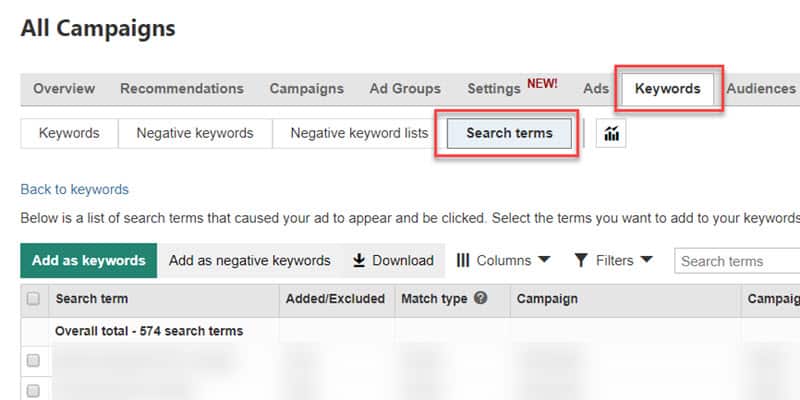
Once you’re already running ad campaigns in Google or Microsoft, examine your search terms periodically. “Search terms” is a tab or submenu item in both Microsoft Ads and Google Ads.
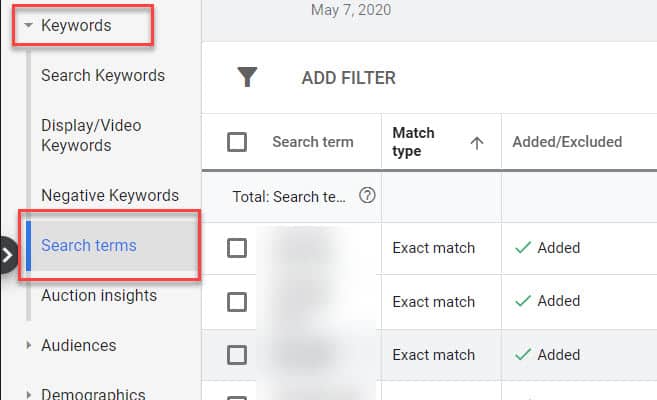
Within this search terms report, you’ll find the actual searches that people have used to trigger your ads. You’re almost guaranteed to find some tremendous negative keyword ideas when you comb through the search terms. Even if you have extensive negative keyword lists before starting your ad campaigns, the searches of the public will surprise you.
You’ll want to check the search terms report daily when you start running a new ad campaign. After you’ve identified some of the more popular negative keywords, you can reduce the frequency to weekly or even monthly for very mature campaigns.
A Tip to Find Negative Keywords
For many campaigns, Microsoft Ads gives much more detailed and extensive search queries. Generally speaking, Google Ads only provides search terms where someone clicked on your ad. Microsoft sometimes provides search terms where your ad showed for a search, but the advertisement was never clicked. The Microsoft Ads Search Term Report can be a hidden gem for finding negative keywords.
Five Ways to Find Negative Keywords
- Search-term reports — especially Microsoft. Comb through Google’s report periodically, and check Microsoft Ads too: it often surfaces queries Google never shows you.
- Our negative keyword lists. First names, last names, cities, states, countries, and software names cut a lot of competitor and irrelevant traffic before a campaign even starts.
- Google Keyword Planner. Use it to uncover terms Google thinks are related to your keywords but that will never become customers — competitor brands, jobs, DIY, and adjacent services.
- Other keyword tools. A tool like Ubersuggest will surface related queries (for a dentist: “dentists for dogs”, “dentists job”) that should be negatives, not bids.
- A library database. Many public libraries subscribe to Data Axle Reference Solutions (formerly ReferenceUSA). You can pull local competitors by industry and city, then turn office names, last names, and even street names into negatives.
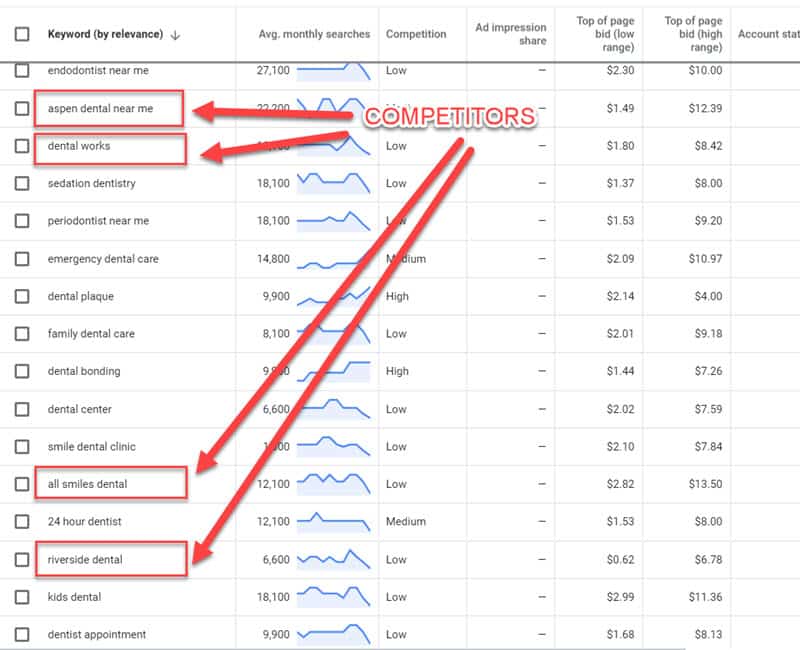
Don’t bid on your competitor’s brand name — and make those names negatives. People searching for the practice across the street usually already have a relationship there. Showing up costs you a click, hurts clickthrough rate, and pays a premium for someone else’s brand.
The Negative Keyword Lists
Copy-ready lists you can review and apply to Google Ads and Microsoft Ads campaigns. Check every term against the keywords you actually bid on before you add it.
- US States — state names and two-letter abbreviations; watch short codes like ME and IN.
- US Cities (100K+) — US cities with a population over 100,000.
- Web Applications and Software — product and software names that steal clicks from local-service ads.
- US Surnames — common last names (competitor and person searches).
- Female Names — common first names.
- Male Names — common first names.
- Countries — country and region names.
Where Do I Add Negative Keywords?
MCC Level Negative Keyword List
If you’re managing a lot of accounts, you can share negative keywords across multiple accounts with an MCC Level negative keyword list.
To create a new list, go into your shared library (under Tools and Settings) and then select Negative Keyword lists.
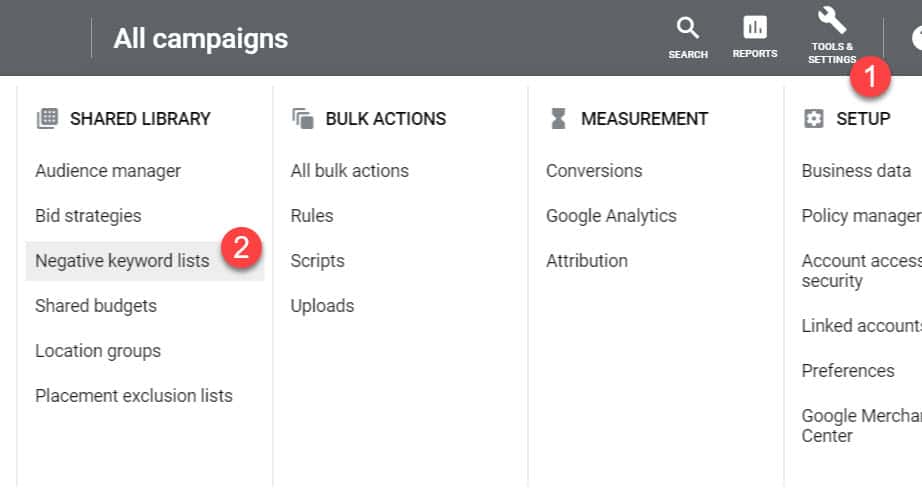
From here, you can create a shareable negative keyword list to use across your client accounts.
You must go into your client accounts individually to add this shared negative keyword list.
Account Level Negative Keyword List
Similar to creating an MCC Level Negative Keyword List, you can go into your account under Tools and Settings — Shared Library — Negative Keyword Lists, and add a new negative keyword list by clicking on the add button.
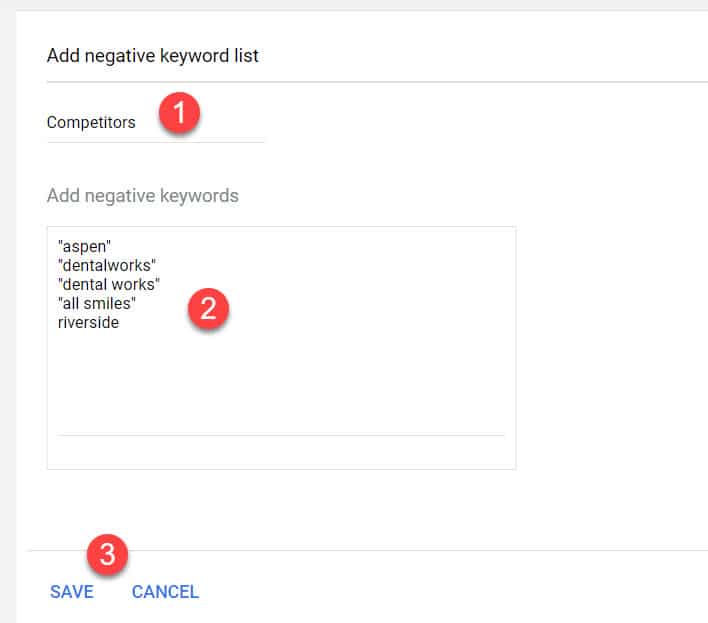
Once you’ve created your negative keyword list, you can add it to individual campaigns within your account.
Campaign and Ad Group Level Negative Keywords
Within the Google Ads interface, you can access Negative Keywords under the Keywords tab of a given campaign. Here, you can enter negative keywords and apply those keywords at the campaign level or ad group level.
Negative Keyword Sculpting
It is a fairly common practice for PPC practitioners to use keyword sculpting.
Keyword sculpting is an advanced topic and involves using negative keywords at the ad group level to correctly associate search terms with the ad that would be most relevant to the user’s search.
For a home services example, let’s say that you have two ad groups:
Ad Group 1: Keywords “Appliance Repair”, “We Fix Appliances”. Ad content: Get Your Appliances Fixed Fast….
Ad Group 2: Keywords “Frigidaire Appliance Repair”, “Frigidaire Compressor Replacement”. Ad content: Frigidaire Appliance Repair Specialists…
In this case, you would want the negative keyword “frigidaire” applied to Ad Group 1. Otherwise Google could send Frigidaire searches to the generic ad. The ad in ad group 2 is more relevant.
Frequently asked questions
Can use of negative keywords improve your Quality Score?
Not officially. Google says negative keywords have no impact on Quality Score. Quality Score is based in large part on clickthrough rate, and Google only takes exact-match versions of your keywords into account — so negatives do not officially change the score, even when they make the traffic more relevant.
What are negative keyword conflicts?
A conflict is a negative that also matches a keyword you are bidding on, so it blocks the ad you meant to run. Don't add lists blindly — review them against the keywords in the campaign first.
Will negative keywords prevent my ads from showing for relevant searches?
They can, if you're not careful. Before adding a negative, make sure you can't think of a circumstance where that term would be a desirable search for the campaign.
Can I use wildcards in negative keywords?
No. Google has advanced search operators on the front end and keyword insertion for ads, but negative keywords are implemented strictly — no wildcards, and no close-variant matching.
Does capitalization matter for negative keywords?
No. Lowercase, uppercase, or mixed case are the same negative keyword in Google Ads.
Is there a difference between singular and plural negative keywords?
Yes. Google treats singular and plural as separate negatives. If you don't offer donuts, enter both "donut" and "donuts".
How aggressive should I be with negative keywords?
Focus on frequent irrelevant terms (or parts of terms). If a one-off search probably won't appear again, adding it is usually wasted effort.
Want your ad budget to stop leaking?
We run paid search for local businesses — negatives included. You'll talk to Frank, not a sales rep.